Backpressure in Data Pipelines
Backpressure in Data Pipelines
Your database writes 50,000 rows per second during a batch import. Your CDC pipeline reads those changes from the WAL and tries to deliver them to Elasticsearch. But Elasticsearch is busy reindexing and can only ingest 5,000 events per second right now.
What happens to the other 45,000 events per second?
Without a backpressure mechanism, the answer is one of three bad outcomes: unbounded memory growth until the process is killed, silent event loss, or WAL accumulation until the database runs out of disk. Backpressure is how a pipeline avoids all three.
What Is Backpressure?
Backpressure is a flow control mechanism where a slow downstream consumer signals upstream producers to slow down. The term comes from fluid dynamics: when a pipe narrows, pressure builds behind the restriction, slowing the flow at the source.
In a data pipeline, backpressure means: when a sink cannot keep up with the incoming event rate, the pipeline stops reading from the source rather than accumulating an unbounded queue of undelivered events.
The alternative to backpressure is buffering without bounds. Unbounded buffers convert a throughput problem into a memory problem, and memory problems end in process kills.
What Happens Without Backpressure
A pipeline without flow control fails in predictable ways. The failure mode depends on where in the pipeline the bottleneck occurs.
Unbounded memory growth. If the pipeline reads faster than it writes, undelivered events accumulate in memory. Memory usage grows linearly with the rate differential. At some point the process exceeds its memory limit and the operating system kills it. On restart, the pipeline replays from its last checkpoint, hits the same bottleneck, grows again, and dies again.
Silent event loss. Some pipelines avoid memory growth by dropping events when buffers fill. This is acceptable for approximate metrics but unacceptable for CDC. A dropped CDC event means the source and destination are permanently inconsistent. There is no mechanism to detect which specific events were lost without a full table comparison.
WAL bloat and disk exhaustion. If the pipeline continues reading from the database but cannot deliver events, the replication slot prevents PostgreSQL from recycling the WAL segments the pipeline has not yet acknowledged. WAL accumulates on disk. If disk fills, PostgreSQL stops accepting writes. A downstream sink being slow causes the source database to fail.
This third failure mode is the most dangerous because the consequence is distant from the cause. A slow Elasticsearch cluster crashes your PostgreSQL primary.
Backpressure Strategies
Several approaches exist for handling a slow downstream consumer. The four most common in data pipelines are listed below. Others exist (rate limiting, demand signaling as in Reactive Streams, elastic scaling of consumers), but these four cover the design space that CDC pipelines operate in. Of them, only one is acceptable for pipelines that guarantee no data loss.
Drop
Discard events when the buffer is full. The pipeline maintains a fixed memory footprint regardless of the rate differential.
This is acceptable for metrics collection, sampling, and approximate analytics where a few missing data points do not affect conclusions. It is not acceptable for CDC. Dropped events create permanent inconsistencies between the source and destination.
Buffer to Disk
Spill events to disk when memory fills. This converts a memory problem into a disk space problem, which buys time (disk is larger than RAM) but does not eliminate the fundamental issue. If the sink remains slow indefinitely, disk fills too.
Disk buffering is useful for absorbing temporary spikes. A sink that is slow for 30 seconds during a garbage collection pause can catch up from a disk buffer afterward. A sink that is permanently slower than the source cannot be saved by any amount of disk.
Sample
Take every Nth event or a random percentage of events. This maintains a bounded resource footprint and delivers a statistical representation of the change stream.
Acceptable for real-time dashboards and approximate monitoring. Not acceptable for CDC, replication, or any use case where completeness matters.
Block
Stop reading from the source when the pipeline cannot deliver events downstream. The source database continues operating normally, accumulating unread WAL. When the sink recovers, the pipeline resumes reading from where it left off. No events are lost, no events are dropped, and memory usage stays bounded.
This is the only strategy compatible with at-least-once delivery guarantees. It is the standard approach for production CDC pipelines.
| Strategy | Memory bounded? | Events lost? | Suitable for CDC? |
|---|---|---|---|
| Drop | Yes | Yes | No |
| Buffer to disk | Temporarily | No (until disk fills) | Partial |
| Sample | Yes | Yes | No |
| Block | Yes | No | Yes |
How Backpressure Works in a CDC Pipeline
A CDC pipeline is a chain of stages connected by bounded buffers. Backpressure propagates backwards through the chain when any stage cannot keep up.
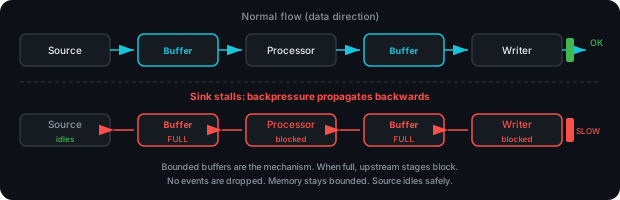
The stages, from source to sink:
- Source reader. Reads change events from the database's replication stream and writes them to an internal buffer.
- Event processor. Reads from the buffer, groups events by transaction, and assembles batches.
- Batch writer. Takes assembled batches and writes them to all configured sinks.
Each stage is connected to the next by a bounded buffer (in Go, a buffered channel). The bounded buffer is the backpressure mechanism. When a buffer is full, the stage trying to write to it blocks. That blocking propagates backwards through the chain.
The Propagation Chain
When a sink is slow:
- The batch writer blocks waiting for the sink to acknowledge a write.
- The event processor cannot hand off the next batch because the writer has not picked it up yet. It blocks.
- The event buffer between the source reader and the processor fills because the processor is not draining it.
- The source reader blocks trying to write the next event to the full buffer.
- The database's replication connection idles. The WAL continues to accumulate, but the connection stays open and the replication slot is preserved.
When the sink recovers, the chain unblocks in the opposite direction. The writer completes the pending batch, picks up the next one, the processor drains the buffer, the reader resumes reading, and the pipeline catches up.
Why This Is Safe
During the stall, the source connection remains open. PostgreSQL sends keepalive messages and the reader responds with standby status updates. The replication slot prevents WAL recycling. No data is lost and no data is dropped. The pipeline simply pauses.
The cost is increased replication lag and WAL accumulation on the source database. This is a known trade-off: the pipeline prioritizes data completeness over latency. Monitoring replication lag is how operators detect that backpressure is active.
Adaptive Batching Under Pressure
A fixed batch size creates a tension. Small batches minimize latency (deliver events quickly) but increase per-batch overhead (more I/O operations per event). Large batches maximize throughput but add latency (events wait in the batch until the size threshold is reached).
Under backpressure, the buffer fills up. This is a signal that throughput matters more than latency right now, because events are already waiting. A pipeline can use buffer fill ratio as a scaling signal:
| Buffer fill | Batch size | Optimization |
|---|---|---|
| Below 50% | 1x (configured default) | Latency-optimized |
| 50-75% | 1.5x | Balancing |
| Above 75% | 2x | Throughput-optimized |
This adaptive approach reduces per-batch overhead when the pipeline is under load (fewer, larger batches mean fewer network round trips to sinks) and reverts to low-latency behavior when the pipeline is idle.
Monitoring Backpressure
Backpressure is not a failure condition. It is the pipeline doing its job correctly under load. But sustained backpressure indicates a capacity mismatch that needs attention.
Metrics to Watch
The metrics below are not exhaustive, but they cover the signals most directly relevant to CDC pipeline backpressure. Systems like Apache Flink expose additional operator-level metrics (busy/idle/backpressured time ratios, checkpoint duration) that apply to general stream processing.
Buffer utilization. The percentage of the internal event buffer that is occupied. Sustained utilization above 80% means the pipeline is consistently slower than the source. Brief spikes during large transactions are normal.
Replication lag. The delay between when a change is committed in the source database and when the pipeline has processed it. Rising lag indicates the pipeline is not keeping up. In PostgreSQL, this is visible in pg_stat_replication as the difference between sent_lsn and replay_lsn (or write_lsn for the CDC tool's slot).
Sink write duration. How long each batch write takes. If sink latency is increasing, the pipeline will eventually backpressure. This metric gives advance warning.
Throughput divergence. The difference between the rate of events entering the pipeline and the rate leaving it. When input throughput consistently exceeds output throughput, the gap represents the backlog growth rate.
WAL disk usage. The amount of WAL retained on the source database. If the pipeline is stalled, WAL accumulates. The wal_status column in pg_replication_slots transitions from reserved to extended when WAL exceeds max_wal_size, and to unreserved when it exceeds max_slot_wal_keep_size.
When to Act
Transient backpressure is normal. A Kafka broker restarting, Elasticsearch reindexing, or a burst of writes from a batch import all cause temporary pressure. The pipeline absorbs these by filling its buffer and draining when conditions normalize.
Sustained backpressure (buffer consistently above 80%, replication lag growing over hours) indicates a structural mismatch. The solution depends on the bottleneck:
- Sink is too slow: Scale the sink (more Kafka partitions, more Elasticsearch nodes), increase the batch size to reduce per-event overhead, or reduce the volume by filtering tables you do not need.
- Pipeline is too slow: Increase the number of concurrent batch writers, enable adaptive batching, or split into multiple pipelines (one per table or table group).
- Source is too fast: This is the hardest case. If the source database produces changes faster than any downstream system can absorb them, you need either a faster sink or selective filtering to reduce volume.
Where to Go from Here
This article covers what backpressure is, why it matters, and how CDC pipelines implement it. The related articles go deeper into connected topics:
- CDC Delivery Guarantees: why at-least-once delivery requires blocking rather than dropping
- Checkpointing and Crash Recovery: how the pipeline resumes after a stall or crash
- Transaction Boundaries: how large transactions interact with buffering and memory pressure
- PostgreSQL WAL: How It Works: replication slots, WAL retention, and how to monitor lag
For the broader picture of how backpressure fits into transaction log processing, see What is Transaction Log Processing.
We built Remac with backpressure as a core design constraint, not an afterthought. The pipeline uses bounded channels at every stage, blocking the source when sinks are slow rather than dropping events or growing memory without limit. Adaptive batching scales batch sizes based on buffer pressure to maximize throughput during load spikes. The default sink failure policy is to block and wait for recovery, preserving at-least-once delivery even when sinks are down for extended periods. If a stall exceeds a configurable duration, the pipeline self-terminates so the process supervisor can restart it cleanly. Remac currently supports PostgreSQL, with MySQL, MongoDB, SQL Server, and Oracle on the roadmap.
Take a look at remac.io.
Further Reading:
- Reactive Streams Specification. The JVM ecosystem's formalization of asynchronous stream processing with non-blocking backpressure.
- Kafka Consumer Design: Moving Beyond a Simple Consumer. Kafka's pull-based consumer model, which provides natural backpressure by letting consumers control their own read rate.
- Designing Data-Intensive Applications, Chapter 11: Stream Processing. Martin Kleppmann's analysis of backpressure, flow control, and bounded buffers in stream processing systems.