PostgreSQL WAL: How It Works
PostgreSQL WAL: How It Works
About Remac: Remac is a high-performance, database-agnostic transaction log processor. It turns native database transaction logs into governed data streams, replicas, audit records, recovery data, and replayable events.
PostgreSQL is Remac's first implemented source, so WAL is the first native log in that work.
PostgreSQL's Write-Ahead Log (WAL) provides the recovery information that supports crash recovery and physical replication. With wal_level = logical and the required logical replication setup, PostgreSQL can also decode selected committed changes for Change Data Capture.
For the overview of how the WAL fits alongside MySQL's binlog and MongoDB's oplog, see What is a Transaction Log. This article goes deeper into the WAL's internals: the write path, record structure, checkpoints, replication slots, and monitoring.
The Write Path
For WAL-logged relations, when you execute an INSERT, UPDATE, or DELETE, PostgreSQL changes shared-buffer state and records WAL before the related data-page write can reach durable storage. Commit settings determine what PostgreSQL must flush before it reports success.
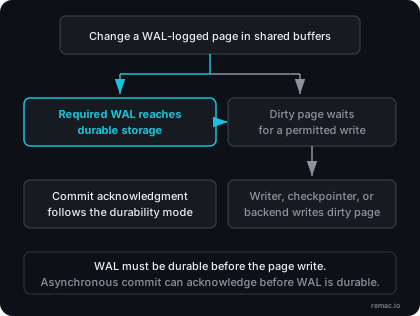
With synchronous_commit enabled, PostgreSQL waits for the required WAL flush before it reports a successful commit. If the client loses its connection before it receives the result, the transaction outcome can be ambiguous to that client.
Three internal functions track where WAL data is in this pipeline:
| Function | What It Returns |
|---|---|
pg_current_wal_insert_lsn() | Where records have been inserted into WAL buffers |
pg_current_wal_lsn() | Where WAL has been written to the OS (but not necessarily fsynced) |
pg_current_wal_flush_lsn() | Where WAL has been flushed to durable storage |
The gap between insert_lsn and flush_lsn represents WAL that PostgreSQL has inserted but has not yet confirmed as durable. With synchronous commit, PostgreSQL flushes through the committing transaction's required WAL before it reports success. Other sessions can continue to insert later WAL, so the two global positions do not have to become equal at each commit. With asynchronous commit, PostgreSQL can report success before that flush. The WAL writer runs according to wal_writer_delay, and PostgreSQL documents a risk window that can reach three times that setting.
Segment Files
WAL data lives in the pg_wal directory as a series of segment files. Each segment is 16 MB by default (configurable at database initialization via initdb --wal-segsize).
Segment filenames are 24 hexadecimal characters encoding three pieces of information:
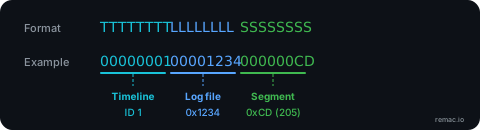
The timeline ID changes when PostgreSQL creates a new branch of WAL history, such as after point-in-time recovery or standby promotion. A new cluster starts on timeline 00000001 and remains on its current timeline until another history branch is created.
You can convert between an LSN and its segment file:
SELECT pg_walfile_name(pg_current_wal_lsn());
PostgreSQL can recycle segment files that are no longer required by crash recovery, archiving, standbys, or replication slots. Recycling renames a file for a later segment position instead of creating a new file.
Inside a WAL Record
Each WAL entry consists of a fixed header followed by record-specific data. The header is defined in PostgreSQL 18's stable source (xlogrecord.h):
typedef struct XLogRecord
{
    uint32      xl_tot_len;   // total length of entire record
    TransactionId xl_xid;     // transaction ID
    XLogRecPtr  xl_prev;      // pointer to previous record in log
    uint8       xl_info;      // flag bits
    RmgrId      xl_rmid;      // resource manager ID
    pg_crc32c   xl_crc;       // CRC-32C checksum
} XLogRecord;
Three header fields connect a record to its source subsystem, its predecessor, and its transaction context.
xl_rmid (resource manager ID) identifies which PostgreSQL subsystem generated the record. Heap records come from table operations. BTree records come from index modifications. XACT records come from transaction commits and aborts. Each resource manager knows how to replay its own records during recovery.
xl_prev links each record to its predecessor. pg_rewind follows this link when it walks backward through WAL to find an earlier checkpoint.
xl_xid identifies the transaction for records that carry a transaction ID. Logical decoding combines WAL records and transaction state to reconstruct committed changes and their boundaries. This is central to preserving transaction context in CDC.
The data that follows the header depends on the resource manager and operation type. Heap records can contain tuple and page-level information that PostgreSQL needs for recovery. The content is binary and requires PostgreSQL-aware tools or logical decoding infrastructure to interpret it correctly.
Full-Page Writes
The first time a data page is modified after a checkpoint, PostgreSQL writes a full-page image, normally an 8 KB page, into WAL. These are called full-page writes (FPW), also referred to as full-page images (FPI).
Disk writes are not atomic at the page level. A PostgreSQL page is normally 8 KB and spans multiple disk sectors. If the server crashes mid-write, the page on disk can end up as a mix of old and new data. This is called a torn page.
Full-page writes prevent torn pages from causing corruption. During crash recovery, PostgreSQL can restore the full page image from the WAL, overwriting a partially written page on disk. Subsequent modifications to the same page before the next checkpoint normally do not need another full-page image.
The full_page_writes parameter controls this behavior and is enabled by default. Disabling it can cause unrecoverable or silent data corruption after a system failure unless the complete storage path provides the required page write guarantee. Keep it enabled unless the storage guarantee has been verified.
Full-page writes can contribute substantial WAL volume on a write-heavy workload with frequent checkpoints. A longer checkpoint interval, controlled through checkpoint_timeout and max_wal_size, reduces how often PostgreSQL reaches the first page modification after a checkpoint. It can also increase crash-recovery time.
WAL compression reduces full-page-image volume by using more CPU. PostgreSQL 14 uses the boolean wal_compression setting. PostgreSQL 15 and later support pglz, plus lz4 and zstd when the server was built with those libraries.
The pg_stat_wal view (PostgreSQL 14+) tracks full-page images through wal_fpi. Comparing wal_fpi with wal_records shows how frequently PostgreSQL generates full-page images relative to WAL records. It does not measure their share of WAL bytes.
Checkpoints
A checkpoint brings the data files up to a recorded point in WAL. After a crash, PostgreSQL starts redo from the redo position in the latest checkpoint record instead of scanning the entire WAL history.
Two things trigger automatic checkpoints:
| Trigger | Parameter | Default |
|---|---|---|
| Time elapsed since last checkpoint | checkpoint_timeout | 5 minutes |
| WAL volume generated since last checkpoint | max_wal_size | 1 GB (soft limit, can be exceeded) |
Whichever threshold is reached first normally triggers the checkpoint. If PostgreSQL has written no WAL since the previous checkpoint, it can skip a checkpoint that would otherwise be triggered by checkpoint_timeout. You can also run CHECKPOINT manually.
During a checkpoint, PostgreSQL spreads dirty-buffer writes across a target portion of the checkpoint interval. The checkpoint_completion_target setting controls that target and defaults to 0.9. PostgreSQL still preserves the WAL-before-data rule: the WAL that protects a page must reach durable storage before the related data-page write. A special checkpoint record is written to WAL. After WAL is flushed, PostgreSQL saves the checkpoint position in pg_control.
WAL segments that precede the segment containing the redo position are no longer needed for crash recovery. Other requirements, including archiving and replication slots, can still prevent their removal. As long as WAL disk usage remains below min_wal_size (default: 80 MB), PostgreSQL recycles old WAL files for future use at checkpoints rather than removing them.
If max_wal_size triggers checkpoints more frequently than checkpoint_warning (default: 30 seconds), PostgreSQL logs a warning suggesting you increase max_wal_size.
Recovery uses checkpoint information to find the WAL position where redo starts. A longer interval can reduce checkpoint frequency and full-page-image volume, but it can also increase the WAL work required during recovery. The measured effect depends on the workload and checkpoint settings.
WAL Levels
The wal_level parameter controls how much information the WAL contains. Each level includes everything from the levels below it.
minimal: Retains the WAL information required for crash recovery or recovery from an immediate shutdown, but not enough for continuous archiving and PITR, streaming physical replication, or logical decoding. Produces the least WAL volume.
replica (the default): Adds enough for physical replication and WAL archiving. A compatible standby can receive and replay the WAL stream to maintain the physical cluster state, subject to PostgreSQL's documented exclusions. This level also supports point-in-time recovery through a base backup and WAL archive.
logical: Adds the information and processing support required for logical decoding. This level is required for PostgreSQL logical replication and log-based CDC. WAL volume depends on the workload and settings such as replica identity.
Changing wal_level requires a server restart. For a CDC consumer that uses the streaming replication protocol, set it to logical and provide enough replication-slot and WAL-sender capacity. The values below are examples and must be sized for the deployment.
wal_level = logical
max_replication_slots = 4    # enough for the logical slots you require
max_wal_senders = 4          # enough for concurrent replication connections
For a comparison of what you can do with physical versus logical WAL consumption, see Logical vs Physical Replication.
Replication Slots
Without a mechanism to hold WAL in place, a CDC tool that disconnects and reconnects might find the segments it needs have already been recycled. Replication slots solve this.
A replication slot tracks the WAL retention state required for a replication consumer. Its restart_lsn identifies the oldest WAL that might still be required. A logical slot also tracks confirmed_flush_lsn, the position through which its consumer has confirmed receiving data.
Physical vs. Logical Slots
| Physical Slot | Logical Slot | |
|---|---|---|
| Purpose | Streaming replication (raw WAL bytes) | Logical decoding (row-level events) |
| Requires | wal_level >= replica | wal_level = logical |
| Output plugin | None | Required (e.g., pgoutput) |
| Tied to one database | No | Yes |
-- Create a physical slot and reserve WAL immediately:
SELECT pg_create_physical_replication_slot('standby_slot', true);

-- Create a logical slot:
SELECT pg_create_logical_replication_slot('cdc_slot', 'pgoutput');

-- Drop either type:
SELECT pg_drop_replication_slot('cdc_slot');
The Disk Usage Risk
This is a common operational problem with replication slots. A slot that falls behind can retain WAL. With the default unlimited slot-retention setting, the retained files can continue to grow until they fill the available disk.
The pg_replication_slots view shows each slot's status. This query uses columns present in PostgreSQL 14 through 18, the supported releases when this article was reviewed:
SELECT slot_name, slot_type, active,
       pg_size_pretty(
           pg_wal_lsn_diff(pg_current_wal_lsn(), restart_lsn)
       ) AS wal_distance_from_restart,
       wal_status
FROM pg_replication_slots;
wal_distance_from_restart is the byte distance from restart_lsn to the current WAL write location. It is not the disk space occupied by WAL files in pg_wal.
The wal_status column shows whether the slot's required WAL is still retained and whether the slot remains usable:
| Status | Meaning |
|---|---|
reserved | Required WAL is within max_wal_size. |
extended | Required WAL exceeds max_wal_size but is still retained by the slot or by wal_keep_size. |
unreserved | The slot no longer retains all required files, and some are due for removal at the next checkpoint. |
lost | Some required WAL has been removed. The slot is no longer usable. |
The default max_slot_wal_keep_size value of -1 permits unlimited WAL retention by replication slots. This protects continuity through a consumer delay, but retained WAL can fill source storage.
A finite value limits slot-driven retention at checkpoint time. It protects storage by accepting a different risk: PostgreSQL can remove WAL that a lagging consumer still needs and make the slot unusable. Choose between unlimited and finite retention from the WAL generation rate, available storage, tolerated consumer outage, alert response time, and the approved recovery path. Recovery can require a new slot and baseline or another valid source of the missing history.
Monitoring
The following views cover WAL generation and active streaming replication.
pg_stat_wal (PostgreSQL 14+)
SELECT wal_records, wal_fpi, wal_bytes, wal_buffers_full
FROM pg_stat_wal;
pg_stat_wal contains cumulative counters since the last statistics reset. Sample them over time and use the differences between samples to calculate rates.
| Column | What to Watch For |
|---|---|
wal_records | Total WAL records generated. Use sample differences to track the record-generation rate. |
wal_fpi | Total full-page images generated. Fast growth relative to wal_records is a reason to inspect checkpoint and full-page-write behavior. The ratio is not a byte fraction. |
wal_bytes | Total WAL bytes generated. Use sample differences for WAL-generation rates and physical-replication capacity planning. |
wal_buffers_full | Forced WAL buffer writes. Sustained growth is a reason to inspect WAL bursts and the wal_buffers setting. |
pg_stat_replication
SELECT client_addr, state, sent_lsn, flush_lsn, replay_lsn,
       write_lag, flush_lag, replay_lag
FROM pg_stat_replication;
For physical streaming replication, these intervals start when recent WAL is flushed locally and end when the sender receives the standby's status:
| Column | What It Measures |
|---|---|
write_lag | Time until the sender learns that the standby wrote the WAL |
flush_lag | Time until the sender learns that the standby flushed the WAL |
replay_lag | Time until the sender learns that the standby replayed the WAL |
For byte-level lag:
SELECT client_addr,
       pg_wal_lsn_diff(pg_current_wal_lsn(), replay_lsn) AS replay_lag_bytes
FROM pg_stat_replication;
These columns can be null or have different meaning for a logical consumer that does not report the same write, flush, and replay positions as a physical standby. For logical slots, also inspect pg_replication_slots, the confirmed position, retained WAL, and consumer-specific metrics.
Where to Go from Here
These WAL mechanics define what PostgreSQL can retain, decode, and send to replication consumers. Logical vs Physical Replication explains when to use each mode of WAL consumption.
For the broader picture of how the WAL fits into transaction log processing, see What is Transaction Log Processing.
Join the Remac waitlist for product updates.
External reference note: The external technical information and linked references in this article were current when we published it. External systems, documentation, and defaults can change after publication.
Further Reading:
- Write-Ahead Logging (WAL). Official PostgreSQL documentation on the write-ahead pattern and why it exists.
- WAL Internals. Official documentation on segment structure, WAL record format, and internal mechanics.
- WAL Configuration. Tuning guide for checkpoints, WAL volume, and fsync behavior.
- WAL Reliability. Official documentation on full-page writes, fsync, and data integrity guarantees.
- Replication Slots. Official documentation on slot mechanics, WAL retention, and monitoring.
- Monitoring Statistics: pg_stat_wal. Column definitions for WAL activity monitoring views.